This piece outlines the steps to prepare your servers for resale, from RAM memory handling to complete data removal.
Your resale success depends on understanding RAM memory’s nature and proper preparation methods, whether you have standard modules or plan an upgrade before selling.
Money isn’t the only concern here. A security firm found that 42% of 159 drives from eBay contained recoverable data. This reality highlights why data sanitization must follow standards like NIST 800-88 before any equipment sale.
Test and Document Server Condition
You need to test your server’s performance to get top dollar on resale. Buyers need proof that their purchase works as advertised. A well-tested server can bring up to 30% more value than untested equipment.
Run Diagnostics To Check Performance
Diagnostic tests lay the groundwork for accurate server pricing on the market. These specialized tools check your server’s components at the same time, from processors and memory to cache systems and storage devices.
You’ll find two main types of diagnostics:
- Quick tests that complete within set timeframes
- Detailed stress tests that show potential problems with subsystems
Dell PowerEdge servers start diagnostics when you press F10 during boot to access Lifecycle Controller diagnostics. HP ProLiant servers need F9 or F10 to enter Intelligent Provisioning diagnostics. IBM/Lenovo systems use DSA Preboot or XClarity tools.
The best testing approach has Power-On Self-Test (POST) verification, component-level checks, and burn-in testing. The burn-in phase runs your server at full capacity for 24-72 hours to simulate real-life usage and spot potential failures. The system tracks temperature, power consumption, and performance metrics during this time.
RAM modules need special attention in your testing process. Many diagnostic tools can find failing RAM cells or address errors that might go unnoticed during normal use. This step matters because working RAM directly affects system performance and stability.
Record Any Issues Or Error Logs
Server error logs tell the full story of your hardware’s health. They show recurring issues and performance patterns that might stay hidden otherwise.
Key metrics to watch include:
- CPU usage percentages
- Memory utilization rates
- Disk space availability
Log files come in different formats. Execution logs show report statistics and performance diagnostics, while trace logs focus on error messages and general diagnostics. Modern servers keep these logs in the system database for easy analysis.
Each manufacturer stores logs differently. SQL Server Reporting Services keeps trace logs in specific folders with timestamps (example: ReportServerService_.log). Windows Application logs also deserve attention; buyers want to review these important server events.
HTTP status codes in error logs tell a story:
- 2xx shows successful operations
- 3xx indicates redirections
- 4xx points to client errors
- 5xx reveals server errors
Clean error logs boost buyer confidence significantly. One IT professional shared: “I once sold a server for $2,000 USD more simply because I provided detailed error logs showing a clean performance history.”
Create A Detailed Item Manifest
A good manifest works like your server’s professional resume. It documents every aspect of your hardware’s capabilities and history.
Your manifest needs:
- Performance metrics from all diagnostic tests
- Server hardware specifications with exact part numbers
- Service tag or serial number information
- Current firmware and BIOS versions
- Full documentation of any replacements or upgrades
This manifest serves as your server’s “health record.” Dell servers should include the service tag so buyers can verify the original factory configuration. This openness builds trust and helps sell servers faster at better prices.
Make sure your RAM modules match the specifications in your manifest. RAM issues often lead to purchase disputes. Big Data Supply RAM offers specialized services to help test and document RAM modules properly.
The manifest should go with your server during shipping. This professional touch gives buyers complete confidence in their purchase, making it worth your time.
Package and Label for Shipping
Your server hardware’s arrival condition depends on proper packaging. The difference between pristine equipment and expensive electronic confetti lies in how you pack it. A really clean and tested system needs careful preparation before shipping.
Disassemble And Pack Components Safely
The right disassembly approach maximizes safety and resale value. You should remove the most delicate components first:
- Extract RAM modules by releasing the side clips and lifting straight up
- Disconnect and remove power supplies after unplugging them
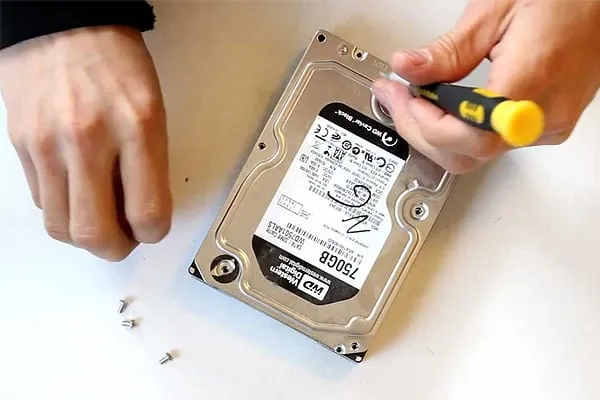
- Slide out drive caddies after properly powering down
- Remove any expansion cards by releasing the locking mechanisms
- Finally, detach cables and document their configuration
Separate removal of fans and power supplies allows thorough cleaning of each part before packing. This methodical approach protects connectors and sensitive components. RAM modules need extra care since even tiny damage to gold connectors can make them useless.
“I once saw a perfectly good server ruined because someone tossed loose RAM sticks in with heavy power supplies,” an IT manager told me. “That $20 USD packing mistake cost them over $800 USD in damaged components.”
Use Anti-Static Bags And Foam Padding
Static electricity silently destroys electronic components, especially RAM. Equipment can fail from a single static discharge without showing visible damage.
Anti-static bags serve different purposes:
- Black conductive bags shield components from static charges and electrical fields
- Pink antistatic bags are budget-friendly options for short-term static protection
- Moisture barrier bags offer multi-layer defense for components that need protection from both static and humidity
- Static shielding bags create a Faraday cage effect to protect sensitive items
Static shielding bags work best for RAM protection. These specialized containers keep electrostatic discharge away from sensitive circuits inside your components.
Quality foam padding prevents component movement during transit. You can cut soft foam sheets to match any packaging dimension. This cushioning stops excessive movement that might damage parts or break connections. Professional shipping companies even use custom wood crating with anti-static bags to maximize protection.
Dedicated foam bases work well for 1U and 2U servers. These bases adjust to fit servers up to 32.5 inches and include foam pockets for rails up to 33 inches, bezels, and power supplies.
Label All Parts Clearly For Tracking
Clear labels prevent confusion when shipping multiple servers or components. Each package needs:
- Manufacturer part number
- Serial number
- Brief description of contents
- Your reference/tracking number
- Destination information
Detailed lists build buyer trust and support better pricing. RAM labels should specify capacity, type (DDR4, DDR5), and speed ratings.
Note that RAM components rank among your most valuable assets. Selling RAM separately in properly labeled anti-static packaging shows professionalism that earns premium prices.
If you’re planning to sell server RAM after securely erasing your data, working with a trusted buyer makes the process easier. Big Data Supply purchases enterprise memory components at competitive rates, helping organizations recover value from retired hardware while maintaining responsible data handling practices.
Bonus tip: Take photos of components before packing as proof of condition. These images protect both parties if shipping damage questions arise later.
Choose the Right Selling Channel
Your choice of sales channel for decommissioned servers impacts your profits and overall experience. The global IT asset disposition industry has grown to approximately USD 29.00 billion in 2025, giving you several ways to recover value.
Compare Online Marketplaces vs. ITAD Companies
Online marketplaces excel with smaller quantities (1-5 servers). Platforms like eBay, Facebook Marketplace, and LinkedIn groups let you deal with buyers directly.
These platforms give you:
- Higher per-unit prices
- Greater control over the selling process
- Access to individual buyers and small businesses
All the same, you should account for marketplace fees (15-20% on eBay) and the extra effort needed to manage listings and shipments.
ITAD (IT Asset Disposition) companies excel at handling complete server lots. These specialists take care of everything from pickup to data wiping and remarketing. Quick turnaround times and certified data destruction services are vital advantages compared to selling pieces individually.
B2B Sales Make Sense For Bulk Equipment
Specialized buyback companies are your best bet for data center decommissioning or large-scale server sales. Bulk sales might bring lower per-unit prices than individual listings, but the convenience makes up for the difference.
Companies like Big Data Supply RAM focus on buying enterprise components, including RAM modules, at competitive rates while handling all logistics.
Look For Certified ITAD Providers With R2 or e-Stewards
The IT asset disposition industry lacks regulation, so certifications become your protection.
Two main certifications stand out:
- R2 (Responsible Recycling) certification ensures providers focus on electronics refurbishment, destroy sensitive data, and follow legal requirements.
- E-Stewards certification adds stricter standards by banning toxic e-waste disposal in landfills and requiring compliance with international hazardous waste rules.
- Certified providers keep detailed records throughout the disposal process, giving you audit-ready documentation that shields your organization from liability.
Final Words:
Getting your servers ready for resale demands attention to detail but can be quite rewarding. This piece covers everything you need to maximize returns while protecting sensitive data.
A proper inventory assessment lays the groundwork for successful server resales. You’ll get better value by documenting specifications and spotting valuable components like RAM modules.
On top of that, it helps to perform secure data erasure to shield your organization from potential breaches and regulatory penalties.
The physical condition of your servers plays a huge role. Clean, well-managed servers can bring in 30% more than dusty, damaged ones. The time you spend removing dust, checking wear, and testing equipment turns directly into profit.
Packaging plays a crucial role, though many overlook it. A single static discharge during shipping can destroy valuable RAM components. Anti-static bags and proper padding serve as profit protectors, not just optional extras.
Read More My Next Mag